Why the week falls apart on Thursday
Almost nobody runs out of time on Monday. The crunch lands late, and it usually lands for one of three reasons.
Gathering and shaping happen in the same place. Reading with an open document is the fastest way to stop reading. You are half-listening to the passage and half-drafting, and the passage loses. Gathering wants to be greedy and unjudged. Shaping wants to be ruthless. Doing both at once gets you a mediocre version of each.
Tuesday’s good idea is unfindable on Saturday. The cross-reference that unlocked it, the illustration from the school run, the word that meant something sharper in Greek, the question you could not answer: these arrive scattered across a week and across three apps, a notebook and a photo of a napkin. What kills Saturday is not having too little. It is not being able to find what you already have.
The outline has nowhere to write. Most outlining tools give you one line per point. But a point is two things: the sentence you say out loud, and the paragraph underneath it that you have to actually think through. Given only the line, you write the line, feel prepared, and discover on Sunday that you never worked out the middle.
The week, in five movements
1. Sit with the passage before you have an idea
Read it several times, in more than one translation, before you decide what it is about. The first idea that arrives is usually the one you already had before you opened the book, and it will fit the text closely enough that you will not notice.
Read the paragraphs either side of it too. A surprising share of sermons go wrong because the passage was cut at a chapter number, and chapter divisions were added in the thirteenth century by someone who was not there.
2. Gather without shaping
Now be greedy and completely unjudged. Collect anything that might belong, and do not ask yet whether it will make it in:
- Passages and cross-references. Where else does this idea appear, and does it appear the same way?
- Words. The ones that are doing more work in Greek or Hebrew than in English.
- People and places. Who is in the room, what has already happened to them, and where this is happening.
- Illustrations. Collected all week, from life, not hunted on Saturday from a website of other people’s stories.
- Quotes. From what you are reading anyway.
- Questions. The ones you cannot answer yet. Write them down rather than steering around them, because the honest ones are usually the ones your congregation is also carrying.
The discipline that makes this work is a single place for all of it. Scattered gathering is the same as not gathering.
3. Find the one thing
Before any outline, write one sentence: what this passage is saying, in plain words, to these people. If you cannot say it in a sentence, you do not have it yet, and no amount of structure will hide that.
The test is whether someone could repeat it in the car park. Not the topic (“prayer”), not the passage (“Philippians 4”), but the claim: anxiety is not a failure of faith to be repented of, it is a weight to be handed over.
This is the point where most of your gathered material dies, and that is correct. Material you collected and did not use was not waste; it was how you found the thing you did use.
4. Shape the outline, with room to write
Two or three or four movements, each serving the one thing. Every point needs both halves:
- The line. One sentence, the way you will actually say it.
- The body. The prose underneath, as long as it needs to be. This is where you find out whether you understand the point or only like the sound of it.
Attach the verses to the point they serve rather than keeping a list at the top. When you are standing up, you want the text beside the thought that needs it.
5. Prepare to deliver, not just to finish
Finished preparation and preachable preparation are different states. A document that reads beautifully on a laptop at midnight can be unusable on a lectern at 10am, and you find out during the only ten minutes that matter.
What you need at the lectern is a different artifact: large enough to read at arm’s length, and impossible to damage by accident. Whatever you preach from, check it the day before in the room, at the distance, at the size.
The unglamorous one: check your passages before Sunday
If you are preaching from a screen, make sure every passage is actually loaded before you stand up, not fetched as you reach it. A church building is one of the more reliable places to have no signal, and the moment you discover it is the moment you needed the verse. Know before you leave the vestry, while going back to paper still costs you nothing.
Taking notes on a sermon you are hearing
This is a different job with a different shape, and using your sermon-prep setup for it does not work. You are not building anything. You are catching something at someone else’s speed, once.
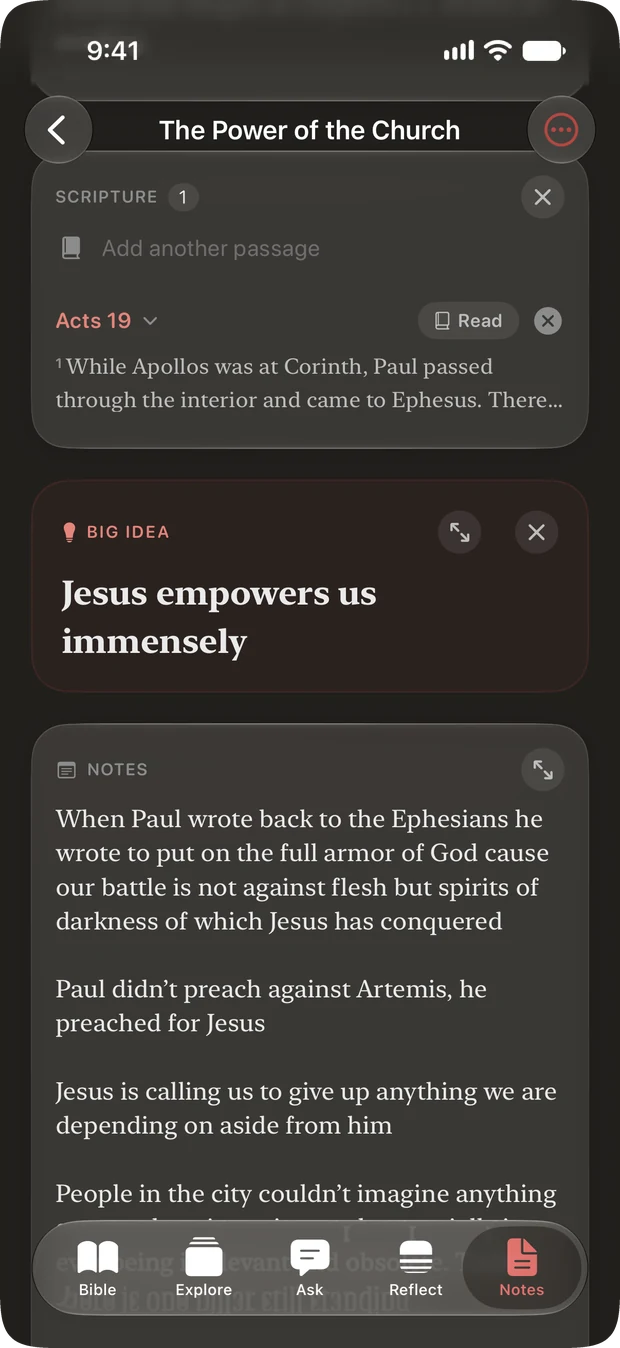
A blank page is the wrong tool, because you end up inventing a structure while the person is still talking. What works is a small set of named places to put things, added before you sit down rather than invented during:
- Scripture. The passages as they come up.
- Running notes. Everything else, unstructured, at speed.
- The big idea. One sentence. If you leave with nothing else, leave with this.
- Main points, each with the verses attached to it.
- Living it out. What this asks of you specifically.
- Action steps. The things you actually intend to do, which is a shorter list.
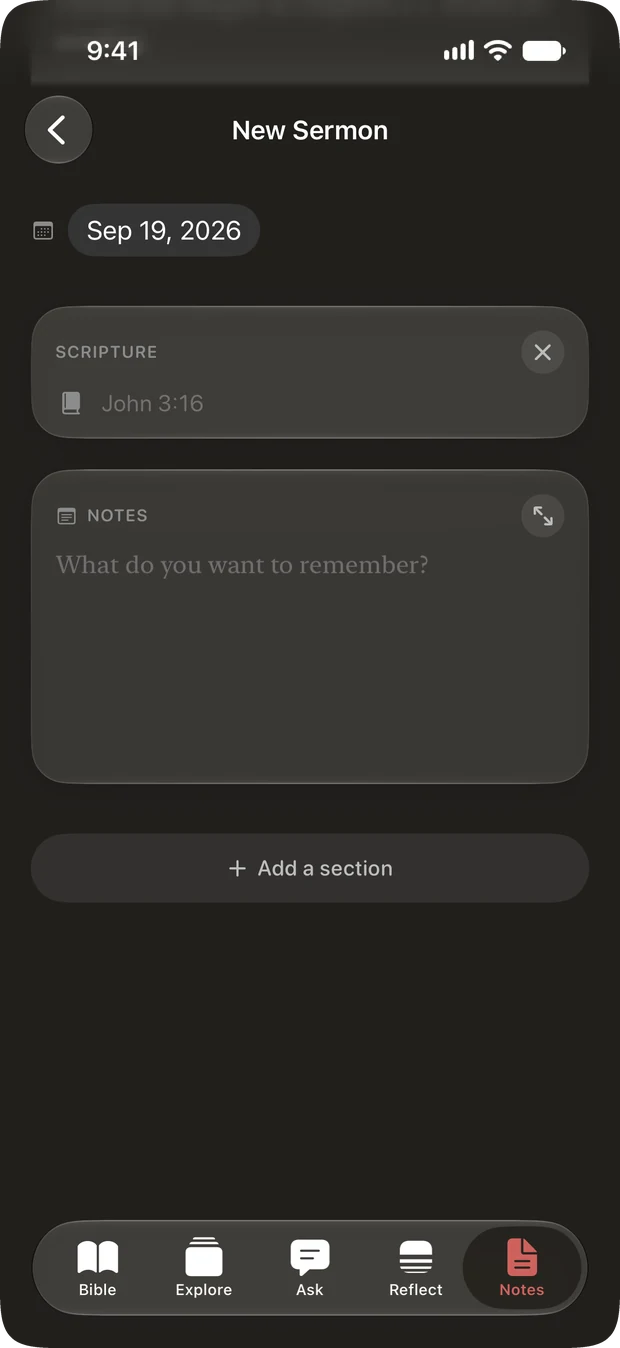
Not everyone wants all of that, and a listener who is only ever going to write prose should not have to scroll past four empty boxes to do it. So the useful arrangement is a couple of sections present from the start and the rest added when you want them, in whatever order suits how you listen.
Group them by series, and a sermon you heard in week two is still findable in week six.
What to look for in a sermon notes app
Most of what is sold as sermon software is a word processor with a Bible in it. A few things are worth checking before you commit a year of preparation to something.
- Can you gather and shape separately? If the only container is a document, you will keep collapsing the two jobs into one.
- Is there room to write under a point? One line per point is the most common and most costly limitation.
- Can you get your work out? Plain text or Markdown export, without asking permission. Years of preparation inside a format you cannot open elsewhere is a risk that only becomes obvious at the worst moment.
- What happens if you stop paying? This is the one to ask first. There is a real difference between losing the ability to write new studies and losing access to a decade of old ones.
- Does it write sermons for you? Decide deliberately whether you want that. An assistant that explains a passage is a different thing from one that drafts your points, and the second one is doing the part that was supposed to change you. If a tool does use AI, ask where the safeguard lives: a prompt that asks a model not to invent references is a hope, and a parser that discards anything the app cannot point at in its own data is a guarantee.
- Does it work with no signal? See above, re: church buildings.
Doing this in Cardinal
Cardinal keeps three kinds of notes apart, because the jobs are different. A study is what you build when you are the one teaching. A sermon note is what you take when someone else is. A verse note is a thought you had while reading, and it stays on the passage.
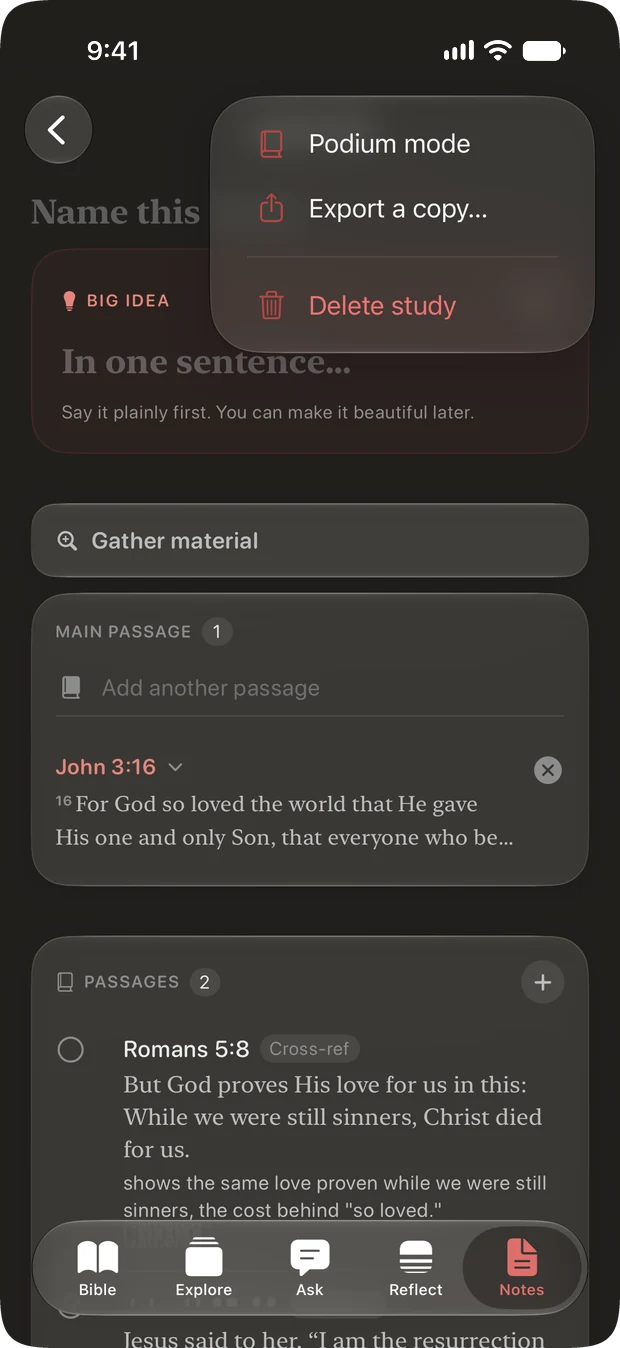
- Gathering has its own place. A study collects across the week onto seven shelves: passages and cross-references, words, people, places, illustrations, quotes, and open questions. The card shows how much of what you gathered actually made it in, which is a more honest number than it sounds.
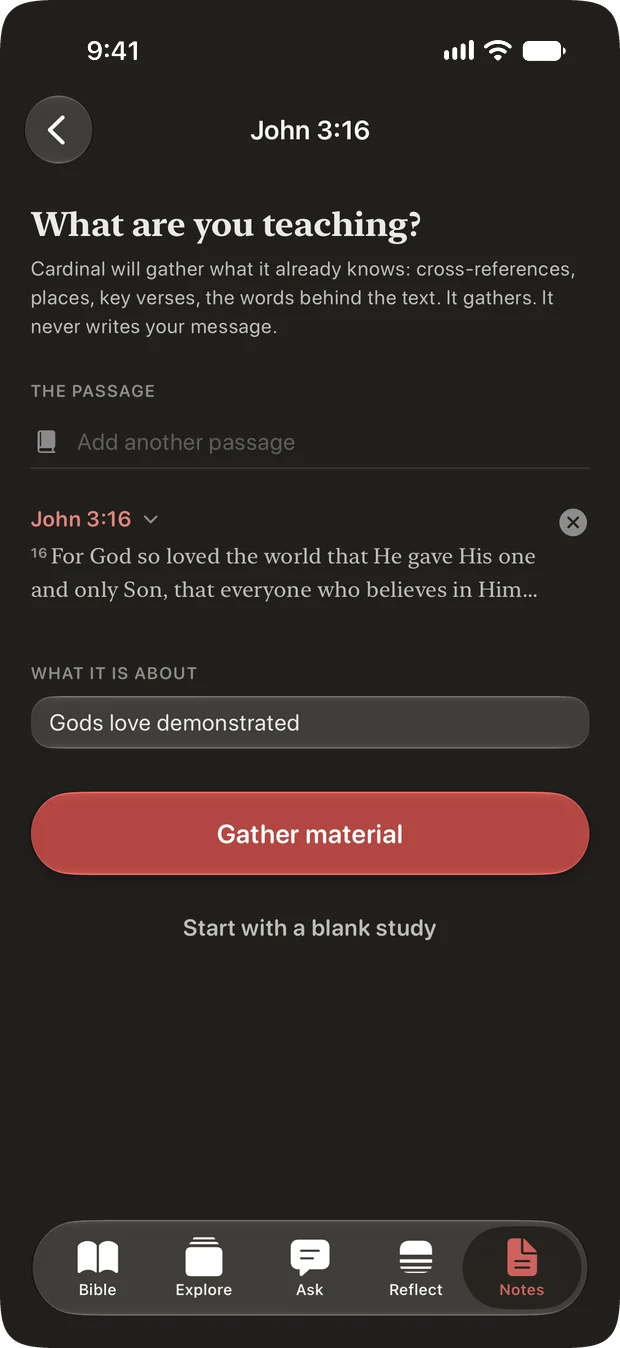
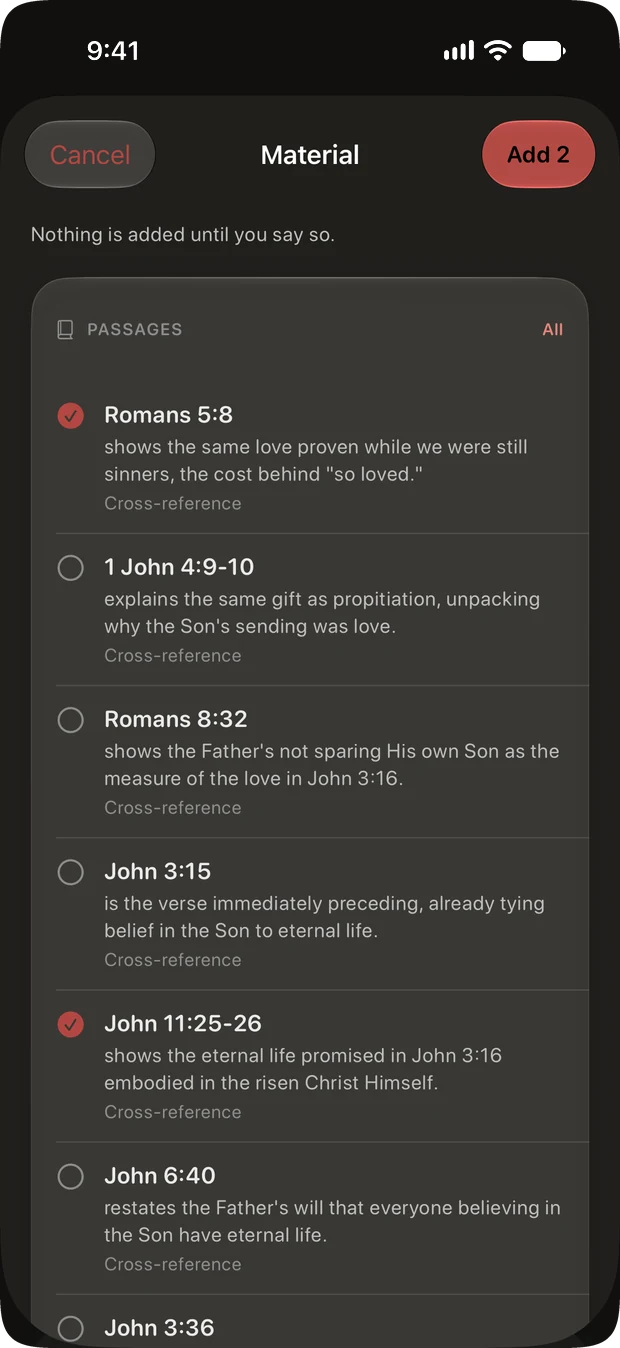
- And a way to start it in one step. Name the passage, say what you are teaching in your own words, and Cardinal proposes what it already knows: cross-references, the places involved, the book’s own key verses, thematically near passages, and the original-language words in the text. Each one arrives with a line saying why it belongs. Nothing is added until you tick it.
- Every outline point has both halves. The line you say out loud, and the prose underneath it, as long as it needs to be.
- Podium mode is a separate screen. Read-only, because the one place you must not accidentally edit a sermon is while you are giving it. Type size is set for the distance to a lectern rather than the size you read at. Every passage is resolved when it opens, so a weak signal shows itself in the vestry rather than at the lectern.
- Sermon notes start shaped, and stay yours. A new one opens with Scripture and running notes. Big idea, main points with their own verses, living it out and action steps are added when you want them, and dragged into whatever order suits how you listen. That order drives the editor, the read view and the export. Group them into a series, and tap a point for a deeper reflection on it.
- Photograph the slide. If the passages are on a screen at the front, take a picture and Cardinal pulls the references out of it on your device. Every one is checked against the Bible first, so a reference that does not resolve to a real verse never appears.
- It exports as Markdown, whenever you want it somewhere else.
- Cardinal will not write your sermon. Ask it to dig deeper into a passage and it answers with cross-references, context and word studies. It does not draft. The study, the structure and the words stay yours.
What “gather” actually does, and what it refuses to do
This is the part worth being precise about, because “AI sermon helper” usually means something a careful preacher should be wary of. Three things are true of it, and they are properties of how it is built rather than promises about how it behaves.
The retrieval is deterministic, and it runs on your phone. Every candidate comes out of a bundled corpus or an on-device index. The same passage and the same theme produce the same list in the same order. No model is involved in finding anything.
The model only ranks and captions what retrieval already found. Each candidate goes to it with an identifier, and anything that comes back with an identifier the app did not issue is dropped. So it cannot cite a verse that does not exist, or a cross-reference Cardinal cannot point at in its own data. That guarantee is in the parser, not in the wording of a prompt, which is the difference between a safeguard and a hope.
It gathers; it does not write. That is the app’s own line on the screen where you start: It gathers. It never writes your message.
There is a fourth thing that falls out of the first: with no signal, or if the AI step fails, you still get the candidates. They just arrive captioned from the corpus instead of by the model. Retrieval never needed it.
Editing a study is part of Cardinal Pro. Reading one, exporting it and preaching from it are never gated, so a lapsed subscription leaves years of preparation readable rather than locked away. Reading the Bible, the guided quiet time and sermon notes are all free, and most of it works with no connection.